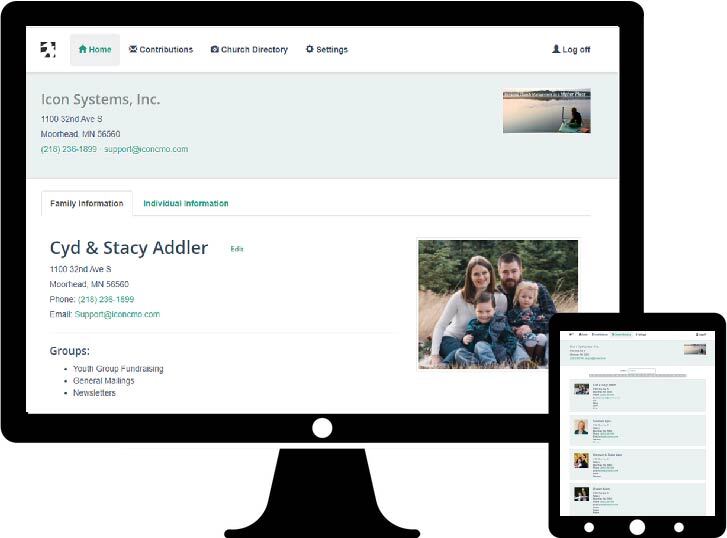
Downloading The Church Software App
Check out the church software apps in the iOS App Store or Google’s Play Store below or look up ‘iconcmo’ in the app store for your device.


Once the app is downloaded, you can log in through the church software app using the credentials that you received from the church administrator via email.
The Church Software App Helps Members To Connect
The church software app helps the church members in many ways to connect to the church but also with each other. This leads to greater reliability of information as congregational members monitor their own profiles. Check out what is available below!
Key church member features
- See and edit/update your personal information.
- Review what groups or talents each individual belongs to.
- Review your contributions history and print a statement.
- Save the church time and money from mailing statements.
- Browse the online church directory.
Administering The Software App
The church administrator can set up church member logins and access rights for any family or individuals in your IconCMO database. Log into your IconCMO database and go to Tools & Services → Member Portal Security. The church database administrator can view changes made by the congregation by running a report.
Key administration features
- Each household is given a unique 8-digit user name and password similar to what a bank or brokerage firm gives to their customers.
- Church staff can simply send reminders to the congregation, asking them to login and review their personal profiles. This will ensure that giving information, mailing addresses and contact information is correct and that special events information such as birthdays, communions, confirmation, graduations, baptisms, etc. are complete.
- The database administrator can define who has Read-Only, Read-Write or No-Access.
Learn more about member portal security in the video below or checkout this detailed blog post.
** Please note that our main menu in the software has been changed since this video was made. You can now find the Member Portal Security located under the Tools & Services menu. **
This is all FREE with IconCMO!