This post was last updated on October 10th, 2022 at 10:32 am.
An update for IconCMO and its Reports!
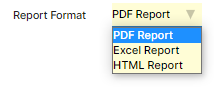
The largest report related release to date for the IconCMO church software solution. The developers have given churches the ability to download reports in an Excel format from the IconCMO church management software (ChMS) solution. The enhancement greatly increases the flexibility of the IconCMO church software. Users can modify the standard reports and add various headings, data, etc. to the downloaded excel file to create their own customized reports. The majority of the reports in IconCMO were modified to offer this feature to our clients. Additionally, we also changed the screens for reporting. The developers are laying the groundwork for future reporting styles to be added to our flagship church software product.
In addition to this great enhancement we have also included the normal export screens to go directly into Excel. Now the system will directly send the data into Excel for the user – saving time in retrieving data for the end user!
Here is a screen shot to show the drop down list of available options:
Icon Systems knows that our users will enjoy these new enhancements and will put it to great use within their ministry. We look forward to releasing more enhancements in the near future. Keep an eye on IconCMO because it is on the move and increases its value to its clients!
Thanks, The Development Team!
When I download a report in Excel, the numbers are saved as “text” rather than numbers, so they’re difficult to manipulate (e.g. even to add dollar signs, you need first to convert cell-by-cell to numbers from saved text). I can’t find a quick universal way to reformat all the cells. Can you help?
James,
The excel reports are meant to take the normal text from the PDF report that user could not edit before and put it into a format that it can be edited. The behavior that is described is the proper behavior. It is to give you a report in a format that you can edit if you desire. It sounds like the part that is frustrating is changing cell by cell. My question would be that in Excel you can change more than one cell at a time using its many built in functions and utilities. Without knowing which report you are running or what is the end goal it is hard to help through a blog posting. I recommend calling our tech support number for IconCMO. Once the data is in Excel we don’t typically support that program however we can possibly give you some hints or tricks to the program. For future reference the blog is to keep people informed as to what we are changing on the program and not for troubleshooting. The support forum, calling technical support or emailing support are the avenues for that.
Additional Note – I will be forwarding this to the programmers because we may be able to change this behavior with the tools we are using. I am not sure about this yet but they will be able to give a more definitive answer.
Edit 5/19/2011: The programmers have improved this feature to work as you’d expect.
Thanks – Jay