• Skip to primary navigation
  • Skip to main content
  • Skip to primary sidebar

Icon Systems

Simple to use. Power to grow.

  • (800) 596-4266
  • Free Trial
  • Blog
  • Features
  • Bookkeeping
  • Order
  • Pricing
  • Resources
  • Login

July 9, 2014 by Icon Systems Leave a Comment

This post was last updated on February 7th, 2024 at 01:04 pm.

Group of toy kids standing in a line

One of our customers recently contacted us with an interesting scenario. She needed to be able to identify youngsters in their church who would be 5 years old by 9/1/2014. She asked us how she could generate such a list in IconCMO. IconCMO has several birthday reports which can provide such information. We started by going to People : Members : Mem-Reports. In this particular instance, we used the “Birthday Name With Age” report. While all of the birthday reports allow you to set a date range, the question quickly becomes one of using the correct range for such a situation. There is also the prerequisite of having entered the birthday dates for all the children in the database. Additionally, the birthday reports allow you to ignore or not ignore the “year” portion of the date values you enter. For this type of reporting, we will need to set the “Ignore year in date ranges” value to “No.”
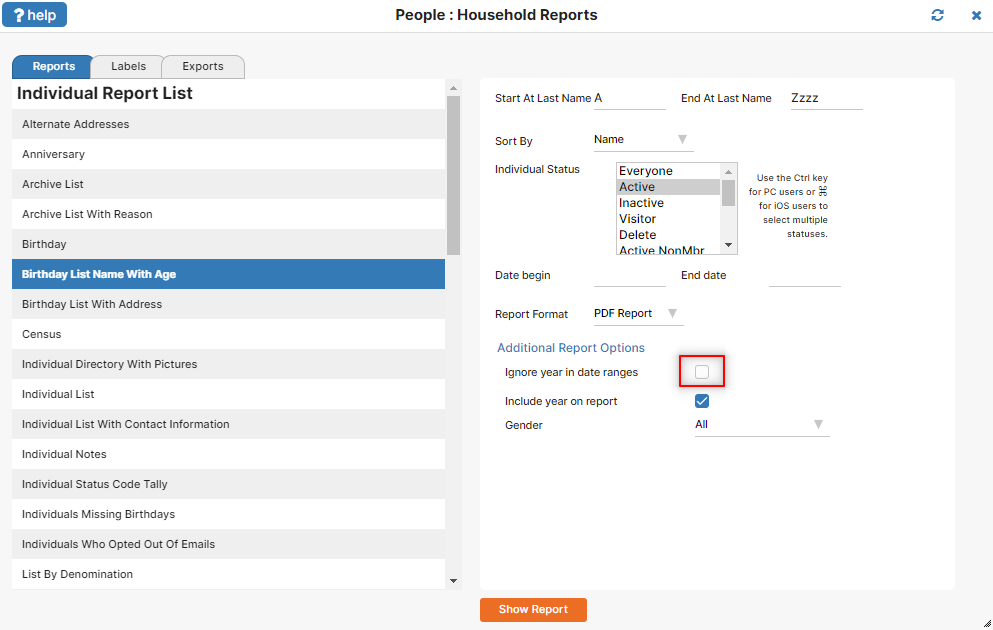
The Member Reports window with the Birthday Name With Age report selected.

So what is the correct date range to use?  If the child must  have turned 5 by 9/1/2014, then the latest they could have been born and still meet this requirement is 9/1/2009. This becomes our “To” date. To calculate the “From” date, simply go back in time another year minus 1 day, so they will not have turned 6 by 9/1/2014. That makes 9/2/2008 our start date.
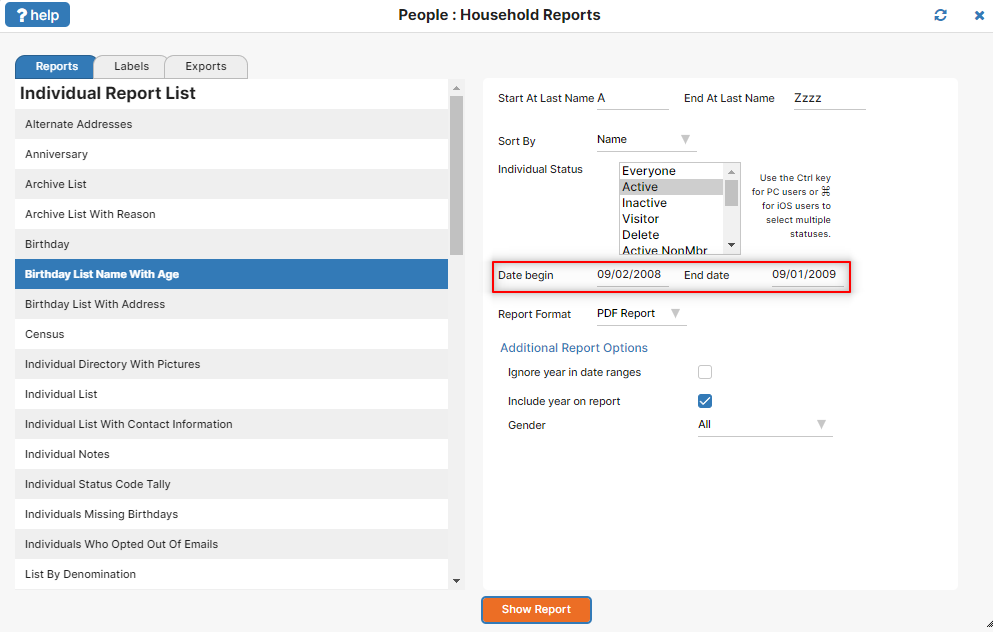
Birthday report setup window with parameters entered

We can double-check our calculations, beginning with the “From” date. If a child is born on 9/2/2008, they will still be 5 years old as of 9/1/2014, even though that child will turn 6 the very next day, 9/2/2014. Checking the “To” date, a child born on 9/1/2009 will turn 5 right on the cutoff date of 9/1/2014.

If you run this report prior to 9/1/2014, it’s possible you may see some children in the report who are still 4 years old, but who will be 5 by the cutoff date of 9/1/2014.
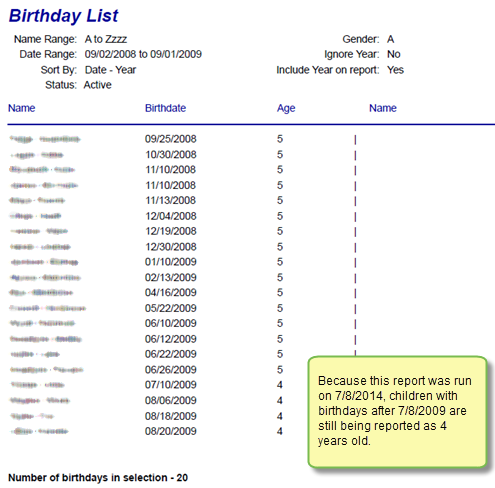
Birthday report PDF output with names-birthdates-ages

Easy, right?  This type of report can be used to determine something such as how many children will be in a particular Sunday School class that begins in the fall. You can probably see how to adjust the date range to pull in a wider age group. For example, if you want a list that includes all children who will be either 4 or 5 years old by 9/1/2014, simply adjust the “To” date ahead another year, to 9/1/2010.

As you become skillful in using reports in IconCMO, you’ll find that a lot of versatility is available for extracting the information you need.

Photo by spekulator on Freeimages.com

Filed Under: People Tagged With: church accounting software, church management software

Avatar for Icon Systems.

About Icon Systems

Icon Systems, Inc. has been a leader in church management software since 1992. We develop high quality software for religious organizations, from church plants to denominational offices. Always improving, we’re committed to continually enhancing our cloud-based church management solutions so we can meet churches’ ongoing needs for efficient administration, effective communication and accurate FASB accounting.

Reader Interactions

Leave a Reply Cancel reply

Your email address will not be published. Required fields are marked *

Primary Sidebar

Toy kids standing hand to hand resembling church members
Top Rated
Church Accounting Software

Search blog posts…

Popular Posts

  • What Are Pass-Through Accounts?
  • Accounting Mistakes: How to Fix Them
  • Quickbooks For Church Accounting
  • Is an All-In-One Church Software the Best Option?
  • Debits and Credits – Does Debit Mean Minus and Credit Mean Plus?
  • Church Software Mobile Apps - IconCMO Set Up
  • Church Donation Software - Audit List
Blog Home

Subscribe to Our Blog!

Sign Up Now
We respect your privacy and you can unsubscribe at any time.
  • The Facebook icon button link
  • The Instagram icon button link
  • The X icon button link
  • The LinkedIn icon button link
  • The YouTube icon button link
  • The Wordpress icon button link
Icon Systems, Inc.
3330 Fiechtner Drive S Suite 204
Fargo, ND 58103
Hours: Mon-Thu 8-5, Fri 8-4 CT
About Us — Privacy — Support — Careers — Sitemap
Recent Blog Posts
  • Is an All-In-One Church Software the Best Option?
  • Church Donation Software - Do you Need It?
  • Text Messaging for Church Software!
  • Is Church Software Online A Better Solution?
  • The Best Church Software Is Compliant & User Friendly!
Sales
800-596-4266
sales@iconcmo.com
Tech Support
218-236-1899
support@iconcmo.com
Fax: 218-236-0235
© 1992 – 2026 Icon Systems, Inc.