• Skip to primary navigation
  • Skip to main content
  • Skip to primary sidebar

Icon Systems

Simple to use. Power to grow.

  • (800) 596-4266
  • Free Trial
  • Blog
  • Features
  • Bookkeeping
  • Order
  • Pricing
  • Resources
  • Login

August 2, 2012 by Robert 4 Comments

This post was last updated on February 20th, 2024 at 09:22 am.

Did you know there’s a nifty little shortcut that can be used when entering dates in IconCMO? It’s not new, but a lot of people don’t know about it.

Today’s date gets filled in by default. But when you are using a date other than the current one, it can sometimes be tedious to type the date in a MM/DD/YYYY format every single time.

Use this shortcut to enter dates into the correct format quickly and without difficulty:

If the date is in the current month, type date in a DD format like this and hit tab:
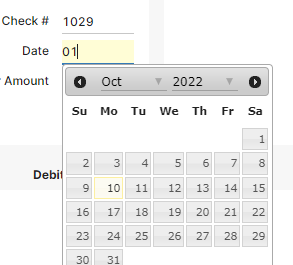
screen capture of the date field

OR if the date is in another month, type the month and date in a MMDD format like this:
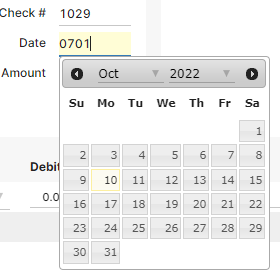
date field showing month and day

It automatically fills in the month, year, and slashes in the correct format:
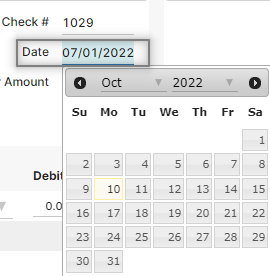
the word pfoom over the screen capture as the system figures out the date for you.

 This shortcut works almost anywhere you have to type a date in the system:

  • Membership (e.g. status date, birthday)
  • Donations (e.g. batch date, giving date)
  • Accounting (e.g. check writing, journal entries)
  • Specifying date ranges on reports

Onomatopoeia courtesy of cybergedeon

Filed Under: Tech Tagged With: church management software, church technology, fund accounting

Reader Interactions

Comments

  1. Avatar for Alvin Reeves.Alvin Reeves says

    August 10, 2012 at 12:12 pm

    This is a great tip! I will begin to use immediately!

    Reply
    • Avatar for Michelle.Michelle says

      August 10, 2012 at 12:15 pm

      Happy to hear! Thanks for the comment, Alvin!

      Reply
  2. Avatar for Chad Brown.Chad Brown says

    August 2, 2012 at 2:25 pm

    Wow, I am actually really excited about this. Sometimes those little touches make such a big difference – thanks for the post!

    Reply
    • Avatar for Michelle.Michelle says

      August 2, 2012 at 2:38 pm

      Thanks for the comment, Chad! Glad to hear you found this tip helpful =)

      Reply

Leave a Reply Cancel reply

Your email address will not be published. Required fields are marked *

Primary Sidebar

Top Rated
Church Accounting Software

Search blog posts…

Popular Posts

  • Church Software Mobile Apps - IconCMO Set Up
  • IconCMO Custom Reporting Beta Is Here!
  • Accounting Mistakes: How to Fix Them
  • Cash or Accrual Based Accounting?
  • Save Time and Money with IconCMO Church Software
  • Debits and Credits – Does Debit Mean Minus and Credit Mean Plus?
  • Fine Tuning: Some Recent Improvements to IconCMO
Blog Home

Subscribe to Our Blog!

Sign Up Now
We respect your privacy and you can unsubscribe at any time.
  • The Facebook icon button link
  • The Instagram icon button link
  • The X icon button link
  • The LinkedIn icon button link
  • The YouTube icon button link
  • The Wordpress icon button link
Icon Systems, Inc.
3330 Fiechtner Drive S Suite 204
Fargo, ND 58103
Hours: Mon-Thu 8-5, Fri 8-4 CT
About Us — Privacy — Support — Careers — Sitemap
Recent Blog Posts
  • Is an All-In-One Church Software the Best Option?
  • Church Donation Software - Do you Need It?
  • Text Messaging for Church Software!
  • Is Church Software Online A Better Solution?
  • The Best Church Software Is Compliant & User Friendly!
Sales
800-596-4266
sales@iconcmo.com
Tech Support
218-236-1899
support@iconcmo.com
Fax: 218-236-0235
© 1992 – 2026 Icon Systems, Inc.