• Skip to primary navigation
  • Skip to main content
  • Skip to primary sidebar

Icon Systems

Simple to use. Power to grow.

  • (800) 596-4266
  • Free Trial
  • Blog
  • Features
  • Bookkeeping
  • Order
  • Pricing
  • Resources
  • Login

February 28, 2013 by Robert 2 Comments

This post was last updated on March 30th, 2021 at 02:42 pm.

We’ve been getting that question a lot this week!

Here is the answer

The new version of Firefox (version 19) includes its own PDF viewer. So your checks are now showing in that instead of Adobe Reader like they normally would.

If you’re using another browser such as Safari, Chrome, or Internet Explorer you can just disregard this whole thing.

firefox logo wordmark horiz RGB iconcmo church software

If you are using FireFox, we have instructions for switching back to Adobe Reader so you can go back to printing checks, labels, and reports happily in IconCMO.

How to disable the FireFox PDF Viewer

Open a new window or tab in FireFox (you don’t have to be logged into IconCMO)

Type the about:config into the URL address bar

Hit the Enter key or click the arrow to go to the address
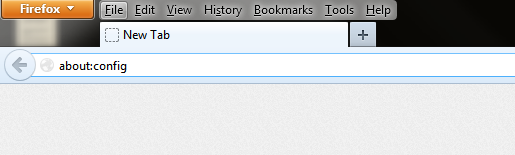
pdf viewer firefox 19 about config settings.
Click “I’ll be careful, I promise!” button, if prompted

Search for PDFJS

Double click on pdfjs.disabled

The value next to pdfjs.disabled will change from false to true
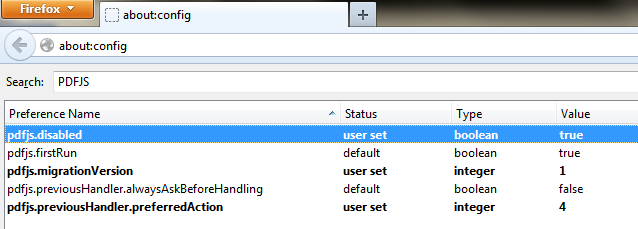
pdf viewer firefox 19 iconcmo reports 4
Next, go to your menu at the top of FireFox and select Tools (hint: if your menu is hidden, press the Alt key on your keyboard to see it)

Under the Tools menu, select Options

Click on the Applications tab

Note for Mac users: Applications will be under Firefox: Preferences instead of Tools: Options

Change the Adobe Acrobat Document to Adobe Reader

Change the Adobe Acrobat Forms Document to Adobe Reader

Click OK
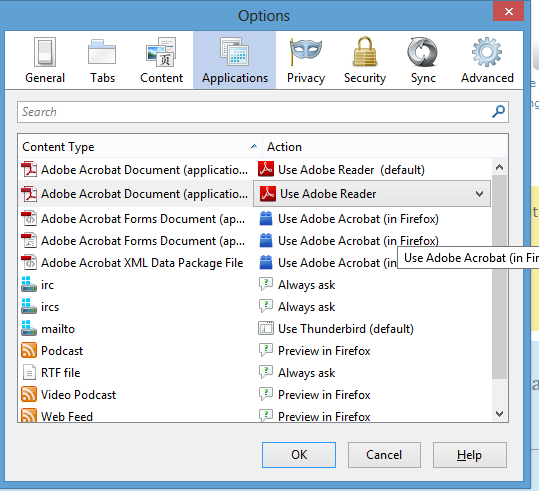
pdf viewer firefox 19 iconcmo reports 6

And you’re done!

Filed Under: Tech Tagged With: church management software, church technology

Reader Interactions

Comments

  1. Avatar for Angel.Angel says

    March 4, 2013 at 2:06 pm

    Thanks Michelle! Always glad to know ICON has or will get the answer I need quickly. Just FYI, I am using a mac and “applications” was under Firefox/ Preferences instead of Tools/Options. Thanks again! You are greatly appreciated.- Angel

    Reply
    • Avatar for Michelle.Michelle says

      March 4, 2013 at 2:11 pm

      You are more than welcome! And thank you for the Mac users tip, Angel!

      Reply

Leave a Reply Cancel reply

Your email address will not be published. Required fields are marked *

Primary Sidebar

Top Rated
Church Accounting Software

Search blog posts…

Popular Posts

  • Debits and Credits – Does Debit Mean Minus and Credit Mean Plus?
  • Save Time and Money with IconCMO Church Software
  • Church Finance - Renting Space And Its Cost
  • Linking Donations to Accounting For Easy Posting
  • Small Groups, Cell or Core Groups, or Bible Studies
  • There is no money in Revenue and Expense accounts
  • A Church Chart of Accounts Explanation - Part 2
Blog Home

Subscribe to Our Blog!

Sign Up Now
We respect your privacy and you can unsubscribe at any time.
  • The Facebook icon button link
  • The Instagram icon button link
  • The X icon button link
  • The LinkedIn icon button link
  • The YouTube icon button link
  • The Wordpress icon button link
Icon Systems, Inc.
3330 Fiechtner Drive S Suite 204
Fargo, ND 58103
Hours: Mon-Thu 8-5, Fri 8-4 CT
About Us — Privacy — Support — Careers — Sitemap
Recent Blog Posts
  • Is an All-In-One Church Software the Best Option?
  • Church Donation Software - Do you Need It?
  • Text Messaging for Church Software!
  • Is Church Software Online A Better Solution?
  • The Best Church Software Is Compliant & User Friendly!
Sales
800-596-4266
sales@iconcmo.com
Tech Support
218-236-1899
support@iconcmo.com
Fax: 218-236-0235
© 1992 – 2026 Icon Systems, Inc.