• Skip to primary navigation
  • Skip to main content
  • Skip to primary sidebar

Icon Systems

Simple to use. Power to grow.

  • (800) 596-4266
  • Free Trial
  • Blog
  • Features
  • Bookkeeping
  • Order
  • Pricing
  • Resources
  • Login

July 21, 2016 by Michelle 3 Comments

This post was last updated on July 9th, 2024 at 08:29 am.

Please follow our updated instructions here and disregard these instructions.

We’re excited to announce we’ve made some updates to the IconCMO login page! First of all, you can now put a button on your church’s website that links directly to the IconCMO login page. No more searching Google or locating a bookmark every time you want to log into your account!
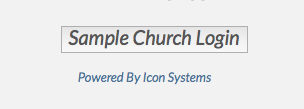
Example of button you can put on your church's website (you can customize the text.)
Example of button you can put on your church’s website (you can customize the text.)

Once you have the button on your church’s website, it’ll lead you to a customized login page featuring:

  1. The Your church’s logo
  2. Your church’s name in the browser tab and below the logo
  3. Your church’s phone number pre-filled, saving you a step
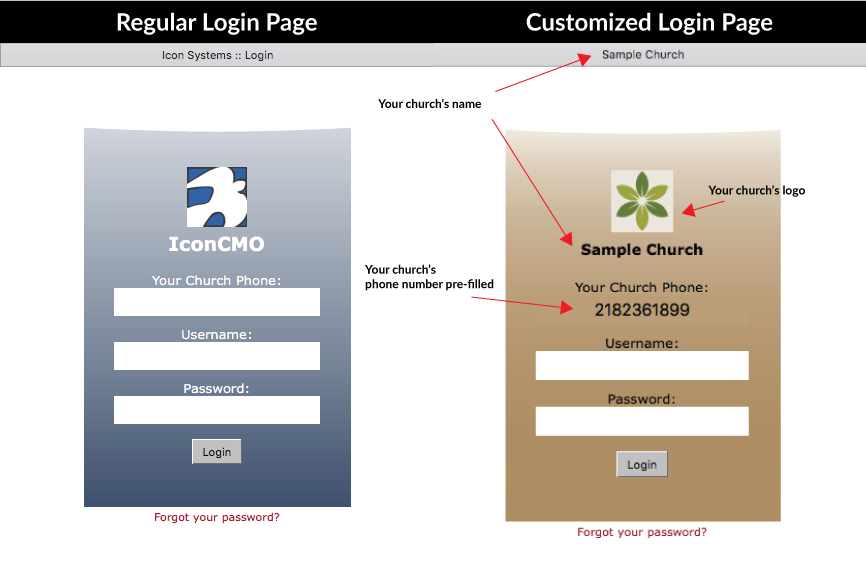
IconCMO-Login that compares the two ways it could lookThe basic process will remain the same: church staff and volunteers will log in with their existing user ID and password to access the church’s IconCMO database. Church members with access to the member portal can use the login page to view their contact informant, giving history, and an online church directory. (Note: if your church isn’t using the parishioner’s module, don’t worry! This update doesn’t automatically grant members access; you’ll still need to do that manually.)

Filed Under: Updates Tagged With: church management software, church technology, church website, cloud computing

Reader Interactions

Comments

  1. Avatar for Carol Wilsey.Carol Wilsey says

    October 10, 2019 at 12:33 pm

    Where are the directions on how to do this?

    Reply
    • Avatar for Carrie.Carrie says

      October 11, 2019 at 12:31 pm

      Great question! You can find that on our webpage here: https://www.iconcmo.com/church-software-easy-login/

      Reply

Trackbacks

  1. Is Your Church using the Member Portal? - Icon Systems says:
    July 8, 2024 at 4:33 pm

    […] just released an exciting new feature that allows church staff and volunteers to log in via a customized login […]

    Reply

Leave a Reply Cancel reply

Your email address will not be published. Required fields are marked *

Primary Sidebar

Top Rated
Church Accounting Software

Search blog posts…

Popular Posts

  • Debits and Credits – Does Debit Mean Minus and Credit Mean Plus?
  • What Are Pass-Through Accounts?
  • Church Software Mobile Apps - IconCMO Set Up
  • Small Groups, Cell or Core Groups, or Bible Studies
  • IconCMO's Online Directory: Your Members Will Love It
  • Church Budget Envelopes -- Don't Stress About Them!
  • Anatomy of A Good Blog Post - Get More Followers!
Blog Home

Subscribe to Our Blog!

Sign Up Now
We respect your privacy and you can unsubscribe at any time.
  • The Facebook icon button link
  • The Instagram icon button link
  • The X icon button link
  • The LinkedIn icon button link
  • The YouTube icon button link
  • The Wordpress icon button link
Icon Systems, Inc.
3330 Fiechtner Drive S Suite 204
Fargo, ND 58103
Hours: Mon-Thu 8-5, Fri 8-4 CT
About Us — Privacy — Support — Careers — Sitemap
Recent Blog Posts
  • Is an All-In-One Church Software the Best Option?
  • Church Donation Software - Do you Need It?
  • Text Messaging for Church Software!
  • Is Church Software Online A Better Solution?
  • The Best Church Software Is Compliant & User Friendly!
Sales
800-596-4266
sales@iconcmo.com
Tech Support
218-236-1899
support@iconcmo.com
Fax: 218-236-0235
© 1992 – 2026 Icon Systems, Inc.